
rabbitmq
软件使用
安装
version: '3'

services:
  rabbit:
    image: rabbitmq:3.8-management
    hostname: rabbit
    container_name: "wycs_rabbitmq3.8"
    restart: always
    ports:
      - "5672:5672"
      - "15672:15672"
    environment:
      - RABBITMQ_DEFAULT_USER=root
      - RABBITMQ_DEFAULT_PASS=123456
    volumes:
      - ./data:/var/lib/rabbitmq
软件控制台
启动控制台
# 找到mq的容器id,即container id
docker ps

docker exec -it #容器id /bin/bash

# 启动管理插件
rabbitmq-plugins enable rabbitmq_management

# 启动完成后退出
exit
管理控制台
http://localhost:15672 当然如果配置的不是这个端口,再自己改下即可
访问管理端口=======点此访问
帐号密码是之前 docker-compose 文件里面的内容,自行填写接口
| 端口号 | 说明 |
|---|---|
| 5672 | 用于 amqp 协议通信,程序连接 rabbitmq 使用 |
| 15672 | 用于 rabbitmq 的 web 管控台界面端口 |
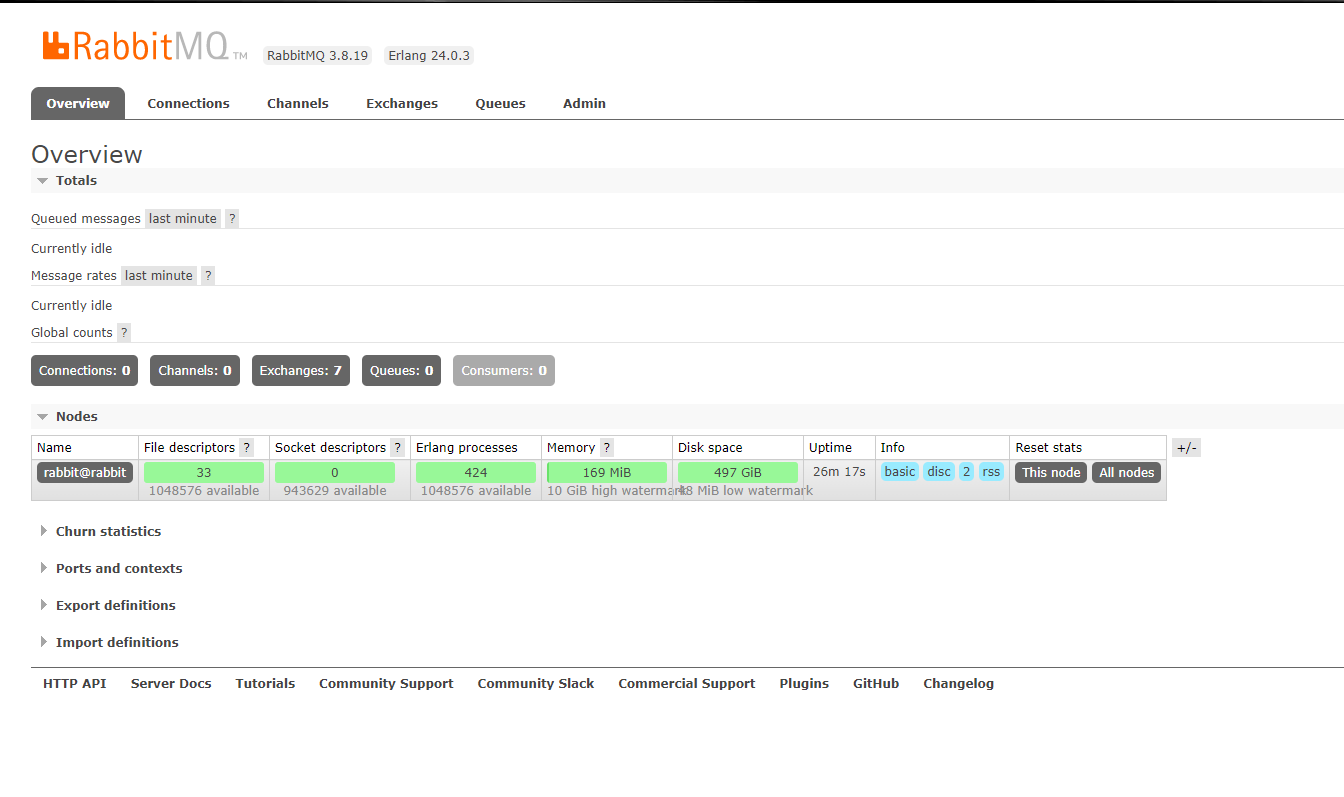
看到以下界面就成功啦~
原理剖析
连接服务
ConnectionFactory factory=new ConnectionFactory();
factory.setHost("127.0.0.1");

Connection connection = factory.newConnection();

// channel 消费者从Rabbitmq获取消息、ack等都是基于channel操作的
Channel channel=connection.createChannel();
ack
唯一标识
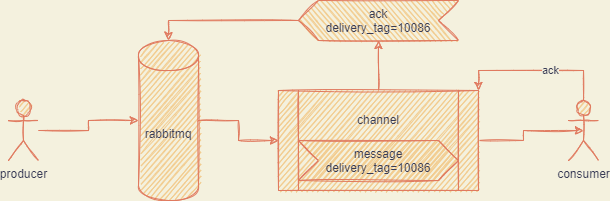
每次消息都有一个唯一标识,delivery tag,通过这个唯一 id,可以定位到一次消息投递
delivery tag 仅仅在一个 channel 内部是唯一标识消息投递的,所以在做消息投递和 ack 时,必须是 ack 投递消息的 channel。
消息持久化
1️⃣ 需要将队列持久化,通过下列的代码让队列持久化到磁盘,这样子到时重启时也可以进行恢复加载
    /**
     * Declare a queue
     * @see com.rabbitmq.client.AMQP.Queue.Declare
     * @see com.rabbitmq.client.AMQP.Queue.DeclareOk
     * @param queue the name of the queue
     * @param durable true if we are declaring a durable queue (the queue will survive a server restart)
     * @param exclusive true if we are declaring an exclusive queue (restricted to this connection)
     * @param autoDelete true if we are declaring an autodelete queue (server will delete it when no longer in use)
     * @param arguments other properties (construction arguments) for the queue
     * @return a declaration-confirm method to indicate the queue was successfully declared
     * @throws java.io.IOException if an error is encountered
     */
    Queue.DeclareOk queueDeclare(String queue, boolean durable, boolean exclusive, boolean autoDelete,
                                 Map<String, Object> arguments) throws IOException;


    @Bean
    public Queue helloWorldQueue() {
        return new Queue("helloworld", true, false, false);
    }
2️⃣ 需要将发送的消息持久化,因为 queue 只是保证本身元数据不丢失,而不保证内部的 message 不丢失,对于投递的消息而言,要设置delivery_mode=2^[持久化配置]
    /**
     * Publish a message.
     *
     * Publishing to a non-existent exchange will result in a channel-level
     * protocol exception, which closes the channel.
     *
     * Invocations of <code>Channel#basicPublish</code> will eventually block if a
     * <a href="https://www.rabbitmq.com/alarms.html">resource-driven alarm</a> is in effect.
     *
     * @see com.rabbitmq.client.AMQP.Basic.Publish
     * @see <a href="https://www.rabbitmq.com/alarms.html">Resource-driven alarms</a>
     * @param exchange the exchange to publish the message to
     * @param routingKey the routing key
     * @param props other properties for the message - routing headers etc
     * @param body the message body
     * @throws java.io.IOException if an error is encountered
     */
    void basicPublish(String exchange, String routingKey, BasicProperties props, byte[] body) throws IOException;
注意事项:假如在投递到 queue 时,还没触发持久化,那么此时消息是会丢失的,RabbitMQ 并不保证 100%消息不丢失的,如果需要全部落盘,需要通过其他机制,比如发送前,先存储,通过外接数据库的形式。
3️⃣ exchange 持久化,指定 durable 为 true
channel.exchangeDeclare(EXCHANGE_NAME, "topic", true);


    /**
     * Actively declare a non-autodelete exchange with no extra arguments
     * @see com.rabbitmq.client.AMQP.Exchange.Declare
     * @see com.rabbitmq.client.AMQP.Exchange.DeclareOk
     * @param exchange the name of the exchange
     * @param type the exchange type
     * @param durable true if we are declaring a durable exchange (the exchange will survive a server restart)
     * @throws java.io.IOException if an error is encountered
     * @return a declaration-confirm method to indicate the exchange was successfully declared
     */
    Exchange.DeclareOk exchangeDeclare(String exchange, String type, boolean durable) throws IOException;
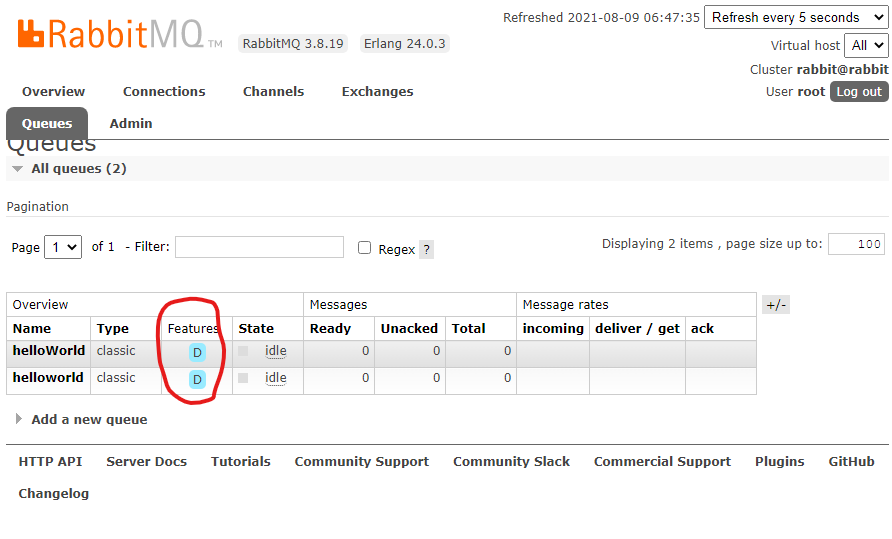
持久化后,可以在控制台界面看到相应的持久化标志
[^持久化配置]: 1 是持久化